











AI Plush Pillow Generator
Transform photos into plush pillow designs with soft fabric textures, cozy cushion appearance, and decorative pillow styling. Convert subjects into comfortable pillow designs with appropriate fabric materials and pillow shapes.
Generated results will appear here
After submitting a task, AI-generated content will be displayed here
Example Gallery
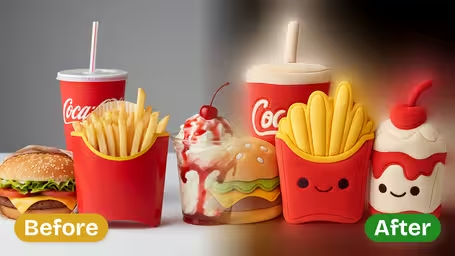
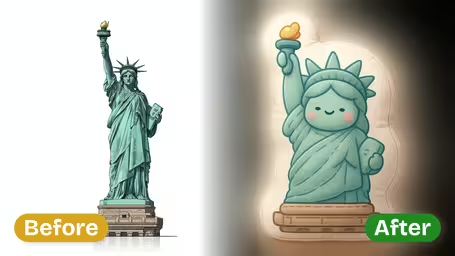
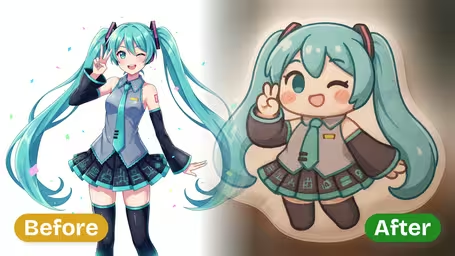
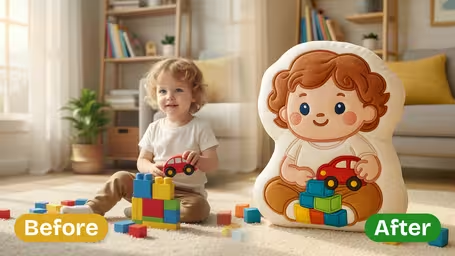
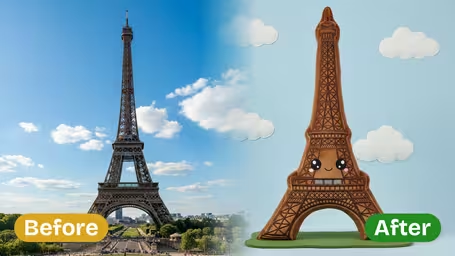






Key Features of Img2Video's AI Plush Pillow Generator
Turn any ordinary photo into a cozy, lifelike plush pillow in seconds with Img2Video’s AI-powered generator, boasting premium realistic textures and endless fun creative possibilities.
Turn Any Photo Into A Huggable Plush Cushion
Generate a custom soft pillow design from any image in just seconds, keeping all fine details of your chosen subject intact while turning it into a playful, cuddly cushion you can almost feel.
Flexible Photo-To-Pillow Conversion
Work with portraits, brand logos, favorite characters or everyday objects to create realistic plush cushion images perfect for creative projects and one-of-a-kind novelty designs, with unrivaled flexibility.
Get Instant Realistic Pillow Mockups
Test out your pillow concepts without spending money on physical materials: upload any photo to get a realistic mockup right away, ideal for prototyping new designs and sparking creative inspiration.
Make Shareable Pillow Art For Social Media
Turn everyday photos into adorable pillow-style art ready to share online, delight your followers and boost engagement across your social media channels.
Ultra-Realistic High-Resolution Rendering
Our cutting-edge AI-driven rendering creates high-resolution outputs that replicate soft plush texture, with microfiber-level detail and intricate accents that look incredibly lifelike.
Try AI Pillow Creation For Free
Test out Img2Video’s AI plush pillow generator at no cost, and turn any photo into charming, lifelike cushion artwork in just moments.
Turn Any Photo Into a Cuddly Custom Plush Pillow With Img2Video’s Free AI Generator
Our easy step-by-step guide walks you through turning any image into a lifelike, soft and adorable plush pillow using Img2Video’s free AI tool.
Upload Your Chosen Photo or Design
Pick and upload any image — from portraits and logos to cartoons and custom artwork — to Img2Video’s AI plush pillow generator to kick off your transformation.
Tips: Higher resolution images deliver crisper, more realistic fabric textures for your finished cushion.
Let the AI Convert Your Image into a Soft Cushion
Give the generator just a few seconds to process your file, and it will smoothly recreate your image as a fluffy round pillow with detailed microfiber-inspired textures.
Tips: Center your main subject in the frame before uploading for the best possible result.
Download or Share Your Plush Pillow Creation
Once your soft cushion image is finished, download it in high resolution or share it straight online to surprise friends, spark design ideas, or level up your social media posts.
Tips: Test out multiple different images to explore all kinds of fun custom pillow designs.
Frequently Asked Questions: Img2Video AI Plush Pillow Generator
Get answers to all common questions about using Img2Video’s AI plush pillow generator to turn any photo into a realistic, soft-looking custom cushion image.
Flexible AI Pricing
Pay-as-you-go credits or subscription plans. No hidden fees, cancel anytime.