










BREAKING 🚨: First look at Veo 3.1 samples 👀 Here is a comparison of Veo 3.1 vs Veo 3 for the same benchmark prompt, "Cyberpunk hacker robot working in front of many monitors" It is getting hot in here! 🔥


Veo 3.1 AI Video Generator
From Google, Veo 3.1 generates 4K video with built-in synchronized audio and automatic lip-sync. Upload reference images to keep your characters visually consistent across all clips, and extend your finished videos out to 148 seconds.
Public
Enhance Prompt
Veo 3.1 YouTube Videos
Watch demonstrations and tutorials showcasing Google Veo 3.1's enhanced 1080p AI video generation with character consistency and native audio
Veo 3.1 Popular Reviews on X
See what people are saying about Veo 3.1 on X (Twitter)

🚨 Veo 3.1 is coming soon — exclusively on Vadoo AI. This isn’t just another update — it’s evolution. 🎬 30-second video generation 🎧 Native audio support 💎 1080p ultra-real output ⚡ Faster. Smoother. More cinematic than ever. And here’s the deal — The first 20 retweets get Show more

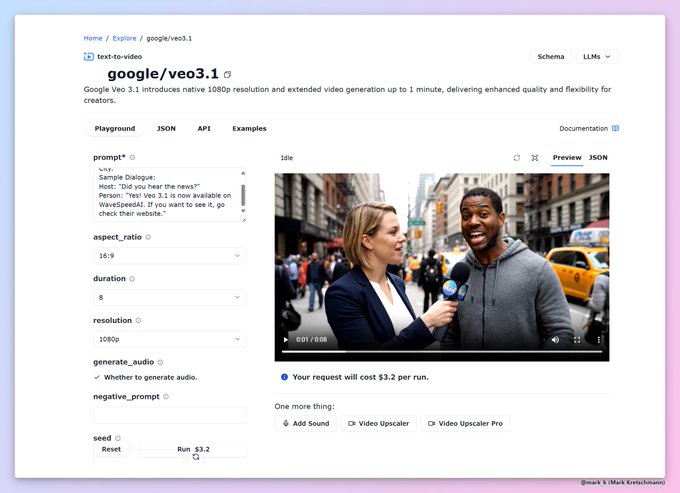
Veo 3.1 is out! on @wavespeed_ai * Resolution 1080p * Maximum video length 1 minute (!) * Price $3.2 per video

Google Veo 3.1 has now surfaced on @wavespeed_ai 🚨 All of the details: * Resolution 1080p * Maximum video length 1 minute (!) * Price $3.2 per video * Native audio generation with dialog You can see a demo video with excellent quality!
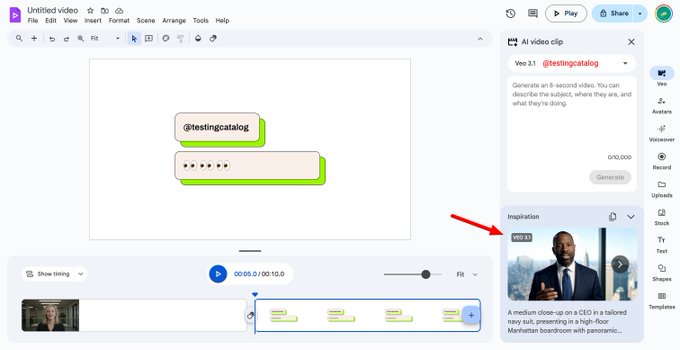
Google made Veo video generation and AI Avatars available on Google Vids for more users! Google Vids is the only Google product that contains hidden traces of Veo 3.1

【🚨 Say Goodbye to AI Video "Fails"! Google Veo 3.1 will land on WaveSpeedAI soon!】 Your main character won't change annoying details anymore! 🔥 Veo is dropping an epic evolution that solves consistency nightmares: 🎬 Ultimate Character Consistency: No more AI "face Show more


Lol, @higgsfield_ai already listed Veo 3.1 in their platform 😏 @testingcatalog @ai_for_success
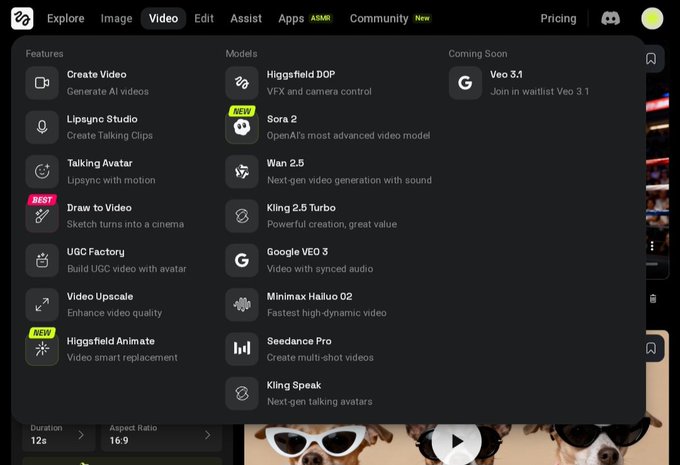
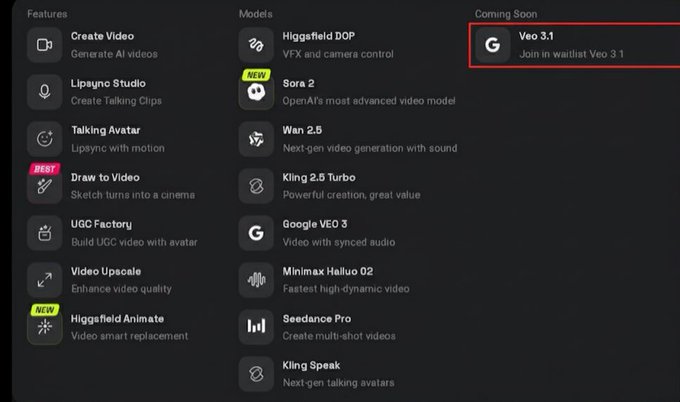
BREAKING 🚨: Veo 3.1 appears on Higgsfield waitlist. Veo 3.1 may be imminent. Sora 2 was in the waitlist just days before release

It is insane .. My First Video on Veo 3.1 The truth about Veo 3.1 is that it can produce 8-second videos. Available on GenVR.ai via @wavespeed_ai It supports 16:9 and 9:16 aspect ratios, with significantly improved emotion.

Veo 3.1 just dropped. 1080p. 1-minute videos. $3.20 per clip. This might be the moment short-form AI cinema becomes real. The question is; can it hold character consistency and audio continuity over a full minute?
What's Veo 3.1
Google's video AI with 4K output, built-in audio, and extended generation
4KResolution
1stLip-Sync Audio
148sVideo Extend
4Reference Images
Google Veo 3.1 generates video at up to 4K resolution with lip-synced audio. It includes reference-to-video for character consistency and can extend clips up to 148 seconds.
4KResolution
1stLip-Sync Audio
148sVideo Extend
4Reference Images
What's Veo 3.1
Google's video AI with 4K output, built-in audio, and extended generation
Google Veo 3.1 generates video at up to 4K resolution with lip-synced audio. It includes reference-to-video for character consistency and can extend clips up to 148 seconds.
Veo 3.1 Features
Google Veo 3.1 delivers upgraded 4K output, fully integrated audio, and powerful new tools to level up your video creation workflow
4K Video Output
Create crisp 3840×2160 resolution videos that look stunning on large displays, while giving you far more flexibility for cropping or reframing during post-production.
Built-in Audio
Automatically generate matching dialogue, sound effects, and background audio perfectly tailored to your video, with built-in lip-sync for all speaking characters.
Reference-to-Video
Upload up to 4 reference images to lock in character appearance, specific objects, or your desired scene style, making it easy to keep a consistent character across multiple clips.
Video Extend
Extend your existing videos with additional footage, for a total runtime of up to 148 seconds. Every new extension analyzes the final second of your clip to seamlessly match existing motion and visual style.
First & Last Frame
Define your desired starting and ending image, then generate a smooth video that connects the two points, ideal for creating custom transitions or linking two separate shots.
Vertical Video
Generate native 9:16 videos directly, no need to crop horizontally shot footage down to size. Built specifically for YouTube Shorts, TikTok, and Instagram Reels.
Multiple Resolutions
Pick your preferred resolution from 720p, 1080p, or 4K, with both 16:9 (horizontal) and 9:16 (vertical) formats available.
Long Prompts
Craft prompts up to 4000 characters long, with built-in translation and prompt optimization tools available whenever you need them.
Veo 3.1 FAQ
Still have questions?
Launched in January 2026 by Google DeepMind, Veo 3.1 is a cutting-edge video generation model. It’s the first model to support 4K (3840×2160), comes with built-in lip-synced audio, allows reference-to-video generation with up to 4 input images, lets you extend videos out to 148 seconds total, and adds full first/last frame control.
720p, 1080p, and 4K (3840×2160). All resolutions work in both 16:9 (landscape) and 9:16 (portrait) formats.
You can upload 1 to 4 images to control how characters, objects, or scenes appear in your generated video. It’s especially useful when you need the same character to show up consistently across multiple separate clips.
It analyzes the final second (24 frames) of your existing video, then generates a new 7-second clip that picks up where the original left off. You can keep extending until your video hits a total length of 148 seconds, and it only works with videos originally created by Veo models.
You supply a starting image and an ending image, and Veo generates a smooth video connecting the two. This works perfectly for creating clean transitions between two different scenes.
Yes. Veo 3.1 generates 9:16 videos directly up to 4K resolution. No need to crop your final output from horizontal footage.
Veo 3.1 automatically generates matching dialogue, sound effects, and background audio that fits your video content. Built-in lip-sync is included for any speaking characters, and audio works with every available feature including Reference-to-Video, First/Last Frame, and Video Extend.
Standard models: 32 credits/second (4s: 128, 6s: 192, 8s: 256). Fast models: 15 credits/second. Reference-to-Video: 32 credits/second. Video Extend: 320 credits (standard) or 90 credits (fast) per extension.
How to Use Veo 3.1 for Text-to-Video Generation
Master Google DeepMind's advanced Veo 3.1 model for creating high-quality videos with native synchronized audio from text descriptions
1
Write Detailed Prompt2
Configure Settings3
Generate VideoDescribe scene, action, camera movement, and audio in up to 4000 characters. Use translation and optimization to enhance prompt quality.
How to Use Veo 3.1 for Image-to-Video Generation
Transform static images into dynamic videos with Google DeepMind's Veo 3.1, featuring synchronized native audio and smooth motion
1
Upload Image2
Add Motion Prompt3
Generate VideoProvide starting frame in PNG, JPEG, or WEBP format (max 50MB). Ensure clear subject and composition for best animation results.
How to Use Veo 3.1 Reference-to-Video
Keep characters and scenes consistent across videos using up to 4 reference images
1
Upload Reference Images2
Write Your Prompt3
Generate and ReviewAdd 1-4 images (PNG, JPEG, or WEBP, max 50MB each). These set the look for characters, objects, or scenes you want to keep consistent.
How to Use Veo 3.1 Video Extend
Add more footage to your videos, up to 148 seconds total
1
Upload Your Video2
Add a Prompt (Optional)3
Generate ExtensionAdd the video you want to extend (max 50MB). Must be a video originally made with Veo.
Flexible AI Pricing
Pay-as-you-go credits or subscription plans. No hidden fees, cancel anytime.