











AI Nose Piercing Filter
AI Nose Piercing Filter - Add realistic nose piercings to your photos with authentic metal jewelry and natural placement. Choose from stud, ring, septum, or double piercings in silver, gold, or black finishes.
Generated results will appear here
After submitting a task, AI-generated content will be displayed here
Example Gallery
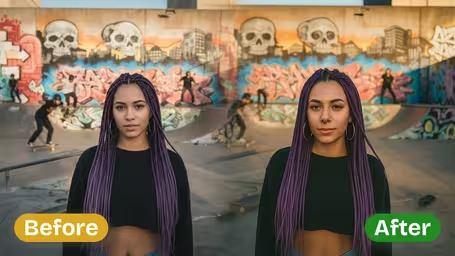




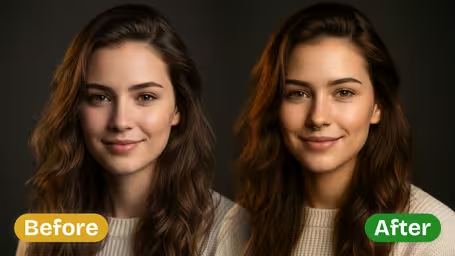






AI Nose Piercing Filter Capabilities
Try out a bold new nose piercing look risk-free with Img2Video’s AI-powered nose piercing filter, which instantly adds hyper-realistic piercings to any photo so you can test and tweak your edgy new style before committing.
Test Out Daring, Standout Piercing Styles
Add a rebellious, on-trend edge to any photo with realistic nose piercings, from understated studs to eye-catching hoops. Img2Video’s filter blends each design flawlessly into selfies, group photos, and social media snaps for a genuinely natural, bold aesthetic.
Pinpoint Accuracy & Lifelike Realism for Every Piercing
Get flawlessly placed, lifelike piercings with natural metallic shine that fits perfectly with your unique facial structure. The filter preserves your original photo clarity while adding your choice of standout studs or hoops to match your personal style.
Risk-Free, Pain-Free Piercing Previews
See how a nose stud or hoop will look on you without any of the pain or commitment of a real piercing. Img2Video’s AI generates ultra-realistic previews in seconds, ideal for getting feedback from friends or grabbing attention on your social feeds.
Get a Bold, True-to-Life Nose Piercing Look in Photos with Img2Video’s AI Filter
Our easy step-by-step walkthrough shows you how to use Img2Video’s nose piercing filter to instantly upgrade your photos with a sharp, edgy, realistic piercing look that feels totally authentic.
Upload Your Photo
Pick any clear photo of you or another person and upload it directly to Img2Video’s nose piercing filter tool. High-quality, evenly lit photos let the filter lay down a perfectly seamless, realistic piercing effect.
Tips: To get the most natural final look, double check that your entire face is in frame and not covered by hats, masks or other accessories.
Apply the Realistic Piercing Effect
Sit back and let Img2Video’s AI drop a hyper-realistic nose piercing into your shot in seconds, no matter if you love a tiny understated stud or a statement thick hoop. The filter keeps all your original facial details intact while blending the new piercing perfectly into your photo.
Tips: Test out multiple piercing styles to land on the vibe that matches your personal aesthetic perfectly.
Download or Share Your Edgy Look
When you love how your bold new piercing shot looks, save the high-resolution file to your device or post it straight to your favorite social platforms to show off your totally realistic, zero-pain new piercing style.
Tips: Save multiple versions of your edited photo so you have both understated and bold looks ready for any occasion.
Frequently Asked Questions: AI Nose Piercing Filter
Get answers to all your most common questions about our AI Nose Piercing Filter, the tool that creates bold, lifelike piercing effects for your photos.
Flexible AI Pricing
Pay-as-you-go credits or subscription plans. No hidden fees, cancel anytime.