











JoJo Filter
JoJo Filter Generator - Transform your photos into highly stylized JoJo's Bizarre Adventure illustration style with bold inked line art, exaggerated anime proportions, and dramatic colored lighting.
Generated results will appear here
After submitting a task, AI-generated content will be displayed here
Example Gallery
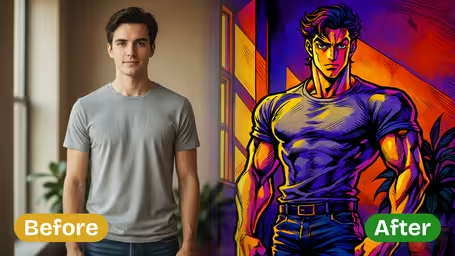
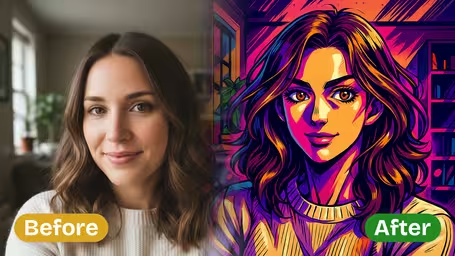
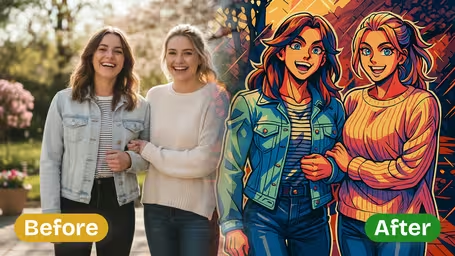
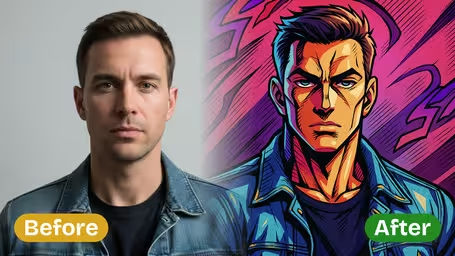
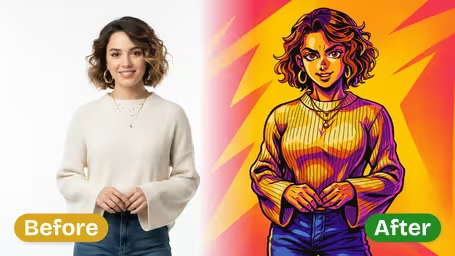






Key Features of Our AI JoJo Filter
Turn any ordinary photo into striking, authentic JoJo-style art with Img2Video’s AI-powered JoJo filter. Get bold, saturated colors, dynamic anime energy, and perfectly preserved, true-to-life facial features every time.
Instant JoJo Style Transformation
Get a professional-grade JoJo-style rendition of your photo in seconds. Our AI filter retains all your unique facial features realistically, while adding the signature expressive anime exaggeration and dynamic, eye-catching background details that make JoJo art iconic.
One-Click Anime Style Conversion
Just upload your favorite photo, and our AI does all the work – turning your image into a finely detailed JoJo-style portrait in a single click. Every nuance of your original expression is preserved while adding that one-of-a-kind anime character charm, no fine details lost.
Vibrant Dynamic Finished Artwork
Leverage the instantly recognizable iconic JoJo art aesthetic, with rich saturated colors, bold signature lines, and immersive engaging backgrounds. Your finished image is ideal for sharing across all your social channels or printing to display as unique standout anime art.
Create Custom JoJo-Style Art From Any Photo With Img2Video’s AI JoJo Filter
Learn how easy it is to reimagine any photo in iconic JoJo anime art style with Img2Video’s AI-powered JoJo filter. Get bold, character-accurate expressions, dynamic backdrops, and the signature distinct JoJo facial features automatically, no editing skills needed.
Upload the photo you want to transform
Pick the photo you want to rework and upload it to the tool. For the most authentic JoJo-style result, confirm that your subject’s face is clearly visible in the frame.
Tips: A sharp, well-lit photo helps the AI accurately recognize your facial features and render a more polished final JoJo-style image.
Apply the AI JoJo filter for instant style conversion
Tap the Create button and let Img2Video’s AI JoJo filter do all the work. In moments, your photo will be transformed into a bold JoJo anime artwork complete with saturated colors and a stylized, dynamic background.
Tips: Experiment with different shots to see how the AI brings different poses, expressions, and angles to life in classic JoJo aesthetic.
Download or share your new JoJo art style image
Save your finished JoJo-style artwork directly to your device, or post it straight to your social media to show off your one-of-a-kind reimagined portrait and stylized background.
Tips: Sharing to platforms that support high-resolution images will keep all the sharp, bold details of your JoJo artwork intact.
AI JoJo Filter FAQ
Clear answers to all common questions about our AI JoJo filter, which turns your personal photos into eye-catching JoJo art style images. We cover usage tips, basic requirements, and common troubleshooting to help you get great results every time.
Flexible AI Pricing
Pay-as-you-go credits or subscription plans. No hidden fees, cancel anytime.