











AI Eye Color Filter
AI Eye Color Filter - Transform eye color to any desired shade with natural iris coloration. Retain original photo realism while enhancing eyes with vibrant, professional color correction technique.
Generated results will appear here
After submitting a task, AI-generated content will be displayed here
Example Gallery
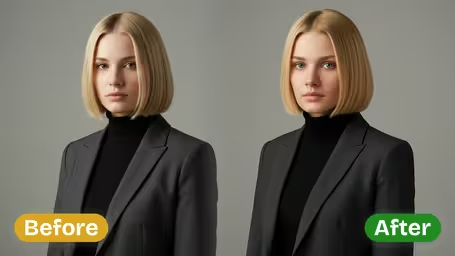
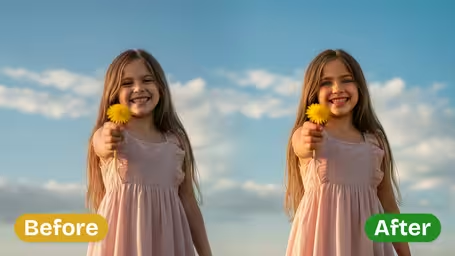

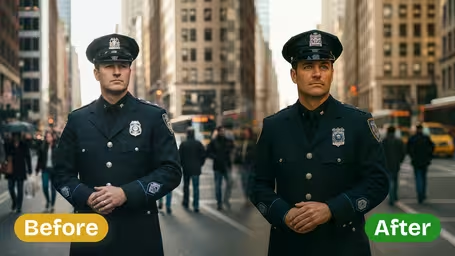
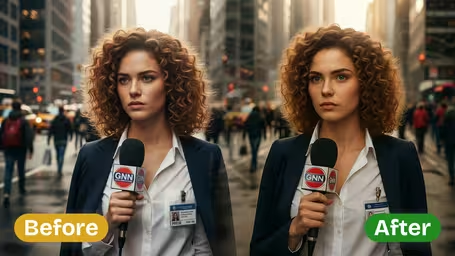
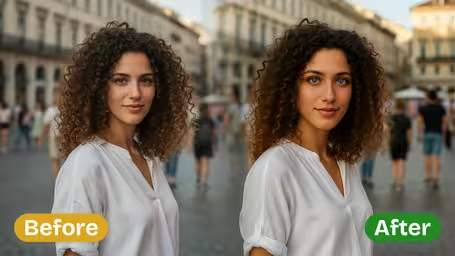






AI Eye Color Filter Features
Discover how Img2Video’s AI eye color filter delivers precision, realistic eye color adjustments for any photo, leaving every other element of your image authentic and untouched.
Precise AI Eye Color Change
Effortlessly adjust your subject’s eye color to any shade you want with Img2Video’s AI-powered tool, for a seamlessly realistic, striking transformation every time.
Natural Lighting Preservation
Your new eye color retains all original natural lighting, subtle reflections and unique iris details, so your final result feels totally authentic and true to life.
Original Photo Features Intact
Only your target eye color is adjusted: our AI filter safeguards original skin tone, facial features and background details, keeping your subject’s natural look fully consistent.
Easily Change Eye Color In Any Photo Online With Img2Video’s AI Eye Color Filter
Our simple step-by-step guide walks you through using Img2Video’s AI eye color filter to refresh eye color in any photo, leaving all other natural facial features completely unchanged.
Upload Your Subject Photo
Begin by uploading the photo where you want to adjust eye color; for the most natural outcome, always pick an image that’s clear and evenly lit.
Tips: Make sure eyes are fully visible and unobstructed to get the most precise, even color adjustment.
Select Eye Color and Apply Filter
Pick your ideal new eye color from the built-in palette and adjust settings to your preference. Tap create to let our AI eye color changer apply the effect with natural, lifelike precision.
Tips: Test out a few different shades to find the option that best complements your subject’s skin tone and facial features.
Download or Share Your Final Photo
After your new eye color is applied, you can immediately download your edited photo or share it directly with friends, with all original photo features preserved except your updated eye color.
Tips: Save a high-resolution copy if you plan to print your photo or use it for professional projects.
AI Eye Color Filter FAQ
This FAQ answers common questions about using our online AI eye color filter to modify eye color in your photos, with guidance for getting naturally blended results that keep all your original photo features intact.
Flexible AI Pricing
Pay-as-you-go credits or subscription plans. No hidden fees, cancel anytime.