











AI Blue Eye Filter
AI Blue Eye Filter - Transform eye color to captivating blue with natural iris effect, enhanced eye appeal, and professional color processing technique.
Generated results will appear here
After submitting a task, AI-generated content will be displayed here
Example Gallery
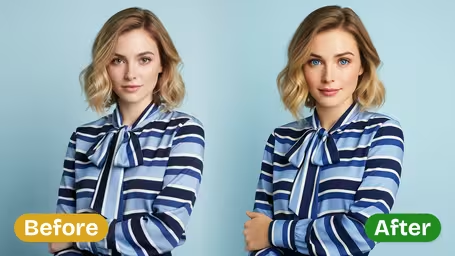
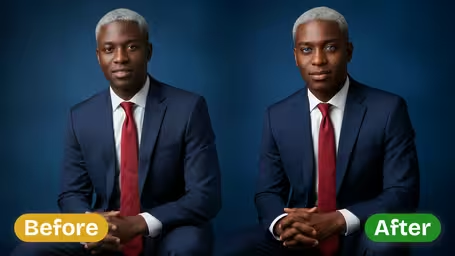
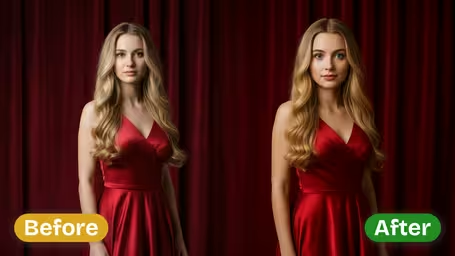
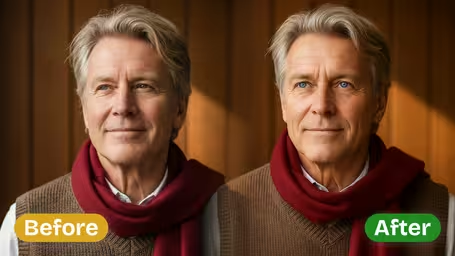
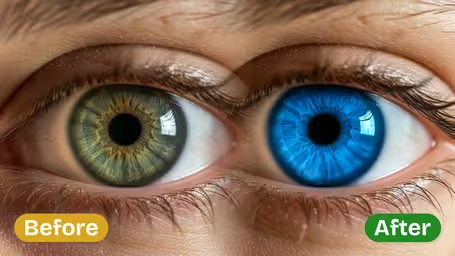
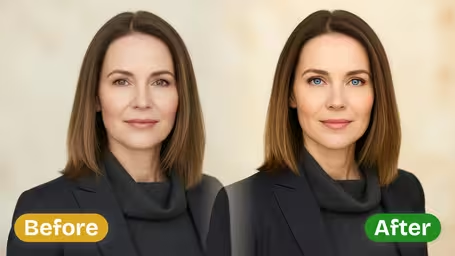






AI Blue Eye Filter Features
Unlock stunning portrait upgrades with Img2Video’s AI Blue Eye Filter, which adds rich, natural-looking blue eyes that perfectly match your photo’s existing lighting for jaw-dropping, authentic results.
Turn Heads With Vibrant Blue Eyes
Transform plain ordinary eyes into captivating, deep blue tones that instantly elevate your portrait photos. Img2Video’s AI creates striking eye effects perfect for social media posts or personal photo keepsakes.
Authentic Natural Blue Eye Realism
Our AI retains every fine iris detail while applying vivid blue that harmonizes beautifully with your photo’s lighting and unique skin tone. This delivers portraits that look naturally impactful for both professional and personal use.
Effortless Blue Eye Charm
Create gorgeous blue eye photos without ever needing to wear contact lenses. Img2Video’s AI delivers attention-grabbing results ideal for selfies, profile pictures, and unforgettable one-of-a-kind portraits.
Step-by-Step Guide to Gorgeous Vibrant Blue Eye Portraits Using Img2Video’s AI Filter
Walk through these easy steps to turn any ordinary photo into a head-turning portrait featuring naturally bright, vivid blue eyes with Img2Video’s AI-powered filter.
Upload Your Photo with Clear Eyes
Pick and upload a high-quality photo where your subject’s eyes are fully unobscured, this lets the AI accurately locate and refine the eye area to deliver a seamless blue filter effect.
Tips: Opt for an evenly lit shot with nothing covering the eyes to get the most realistic, accurate finished result.
Apply the Vibrant Blue Eye Effect Instantly
Sit back while Img2Video’s AI filter automatically shifts your eye color to a deep, vivid blue, all while keeping natural iris texture, authentic lighting, and your original photo quality fully intact.
Tips: Preview the effect to confirm the blue hue looks natural and matches the aesthetic you want for your portrait.
Download or Share Your Striking New Look
Save your updated portrait with gorgeous vibrant blue eyes straight to your device, or post it instantly to social media to show off your eye-catching new look.
Tips: Select the highest resolution option when saving if you plan to print or share the image in large formats.
Frequently Asked Questions: AI Blue Eye Filter
Get clear answers to all your most common questions about using the AI Blue Eye Filter to create gorgeously vibrant, natural-looking blue eyes in your photos.
Flexible AI Pricing
Pay-as-you-go credits or subscription plans. No hidden fees, cancel anytime.