











3D Miniature ESC Keycap
3D Miniature ESC Keycap Generator - Transform subjects into highly detailed miniature 3D scenes enclosed inside a transparent ESC keycap on a computer keyboard.
Generated results will appear here
After submitting a task, AI-generated content will be displayed here
Example Gallery

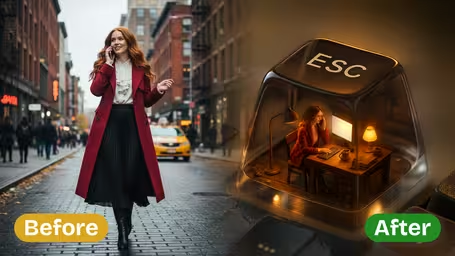
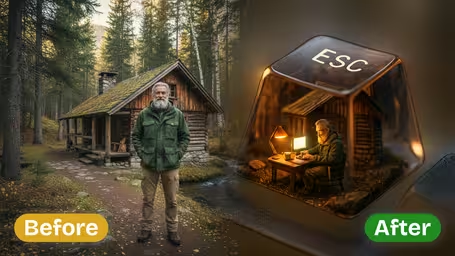
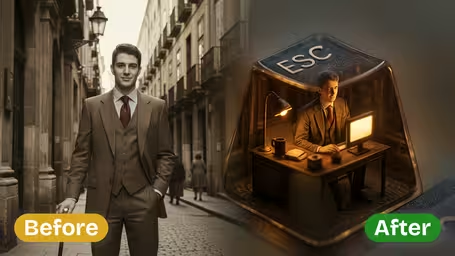
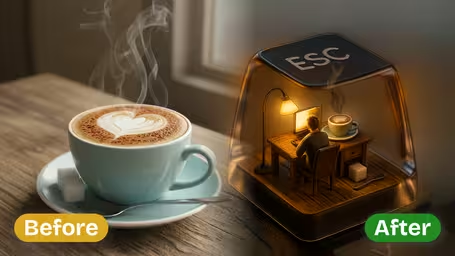






Features of Img2Video's AI 3D Miniature ESC Keycap Generator
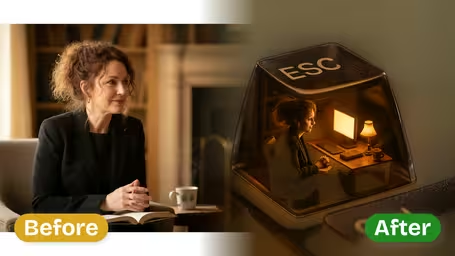
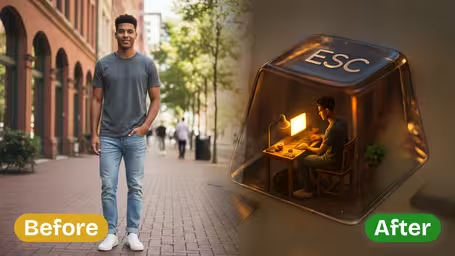
See how Img2Video’s AI-powered 3D miniature ESC keycap generator turns any image you upload into a hyper-realistic, finely detailed tiny working scene that fits perfectly inside an ESC keycap.
Turn Image into Miniature Workspace Keycap
Upload any photo featuring your chosen subject, and get an instant vivid 3D miniature ESC keycap scene showing them at work. Our AI builds out the entire working environment inside the keycap, perfect for one-of-a-kind custom art or custom keyboard design projects.
Miniature Keycap with Accurate Details
Cutting-edge AI processing perfectly captures and replicates your subject's facial features, clothing, and every other small visual detail from your original image. Every tiny element of the miniature workspace inside the keycap matches your source photo for an incredibly realistic, lifelike result.
Immersive Workspace Scene in Keycap
You get a static but visually stunning 3D ESC keycap scene that depicts your subject hard at work, complete with realistic details like a desk, monitor, and work accessories. The output is a polished, professional-looking miniature display that complements any keyboard setup perfectly.
Turn Any Photo Into a Custom 3D Miniature ESC Keycap Working Scene With Img2Video Generator
This simple walkthrough shows you how to upload your photo, let the Img2Video ESC keycap AI build a lifelike custom miniature working scene, and save your one-of-a-kind digital artwork in minutes.
Upload your photo to launch your custom ESC keycap scene build
Pick and upload the image with the subject you want turned into a 3D miniature working scene for your ESC keycap. Make sure your subject is clearly visible with all important details intact to get the most accurate, polished final result.
Tips: To get the highest quality output, use a high-res photo where your subject and details are well-lit and not blocked by other elements.
Let the Img2Video AI analyze and construct your custom miniature ESC working scene
Our AI-powered tool will process your uploaded photo, identify your subject, and build a vivid, lifelike scene showing your subject at work inside the miniature keycap, complete with core details like desks and monitors.
Tips: Give the tool a moment to process: detailed miniature scenes need a little extra render time to get that ultra-realistic finish you want.
Save or share your finished custom 3D miniature ESC keycap scene
As soon as your scene is finished generating, you can save the image directly to your device or share it online to show off your one-of-a-kind custom miniature keycap working scene.
Tips: This image works perfectly for custom keyboard design projects, or as a stand-alone unique piece of digital art to share.
FAQ: AI 3D Miniature ESC Keycap Generator
Get answers to your most frequent questions about our AI 3D miniature ESC keycap generator, which converts your original images into vivid, detailed working scene keycaps.
Flexible AI Pricing
Pay-as-you-go credits or subscription plans. No hidden fees, cancel anytime.